Streaming and social give cover art two extremes: a 3,000 × 3,000-pixel square on Spotify and a thumbnail no bigger than a fingernail on an Instagram grid. For an independent artist, that one image often has to announce the release, fill the feed post, sit behind a countdown sticker and still look sharp on a vinyl sleeve or a T-shirt months later.
An AI album cover generator only helps if the art stays readable at every size, arrives in the right file format, and comes with rights that hold up when a distributor or a merch printer asks. A beautiful render that turns to mush at playlist size, or a licence that forbids paid ads, costs more time than it saves on release week.
The seven tools below were compared against four must-haves: thumbnail clarity, a 3,000-pixel square export, confirmed commercial use, and a fast hand-off into Stories, Reels and feed posts. Each one earns its place for a different kind of creator, from producers who want the cover to become a video to artists whose face belongs on the front.
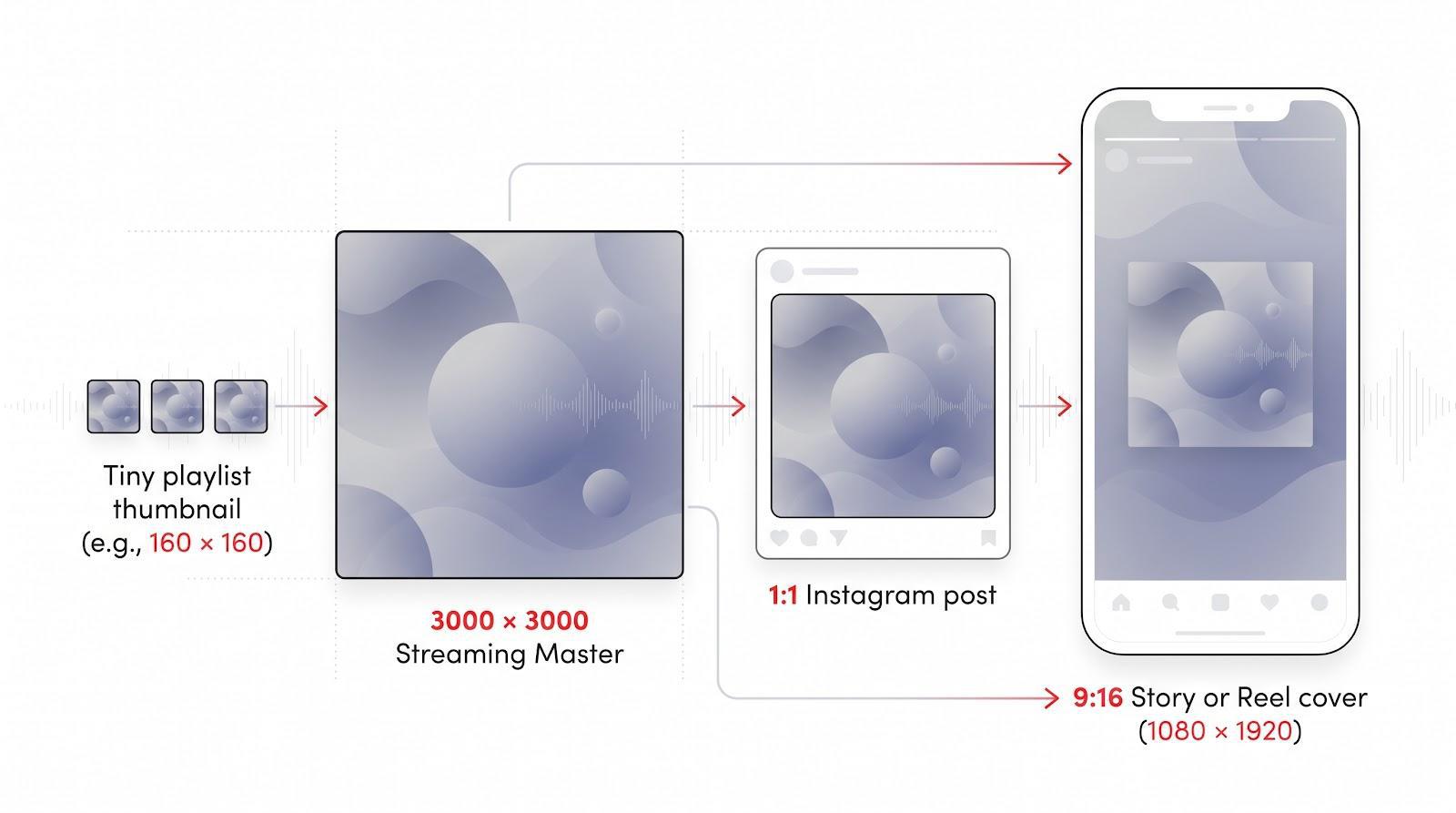
One cover master, four places it has to work
Advertisment
Each platform was reviewed through its public demos, documentation and licensing pages, so every claim below can be checked on the vendor’s own site. From that review, five practical checkpoints decided the ranking:
Only tools that handled all five made the list, and the order reflects how well each one covers the whole path from studio file to social post. Price was not used as a ranking factor, because plans change often and most creators already know their budget. Instead, each entry notes where licence terms depend on the plan, so the rights question can be checked before paying.
Neural Frames is built for musicians first, so its album cover tool starts from the music rather than from generic “art styles.” A creator describes what belongs on the cover in a short text prompt, such as a mood, a scene, an object or a colour palette, then picks one of 36 music styles that run from hip-hop to metal and from synthwave to watercolour. The tool returns a high-resolution 3,000 × 3,000 square PNG in a few seconds, already sized for Spotify or Apple Music with no resizing.
Every cover is generated from scratch and is unique to its prompt, so two artists typing similar ideas will not end up with the same image. If the first result misses, regenerating produces a new take, which makes it quick to chase a focal point that still reads at playlist size. A practical approach is to write the prompt around one strong subject and one or two colours, then regenerate until the main shape stands out clearly when the image is viewed small. Busy scenes with many small details tend to blur on a phone, while a single bold object against a simple background holds up.
The rights are clear. Commercial use is included, so the cover can appear on streaming releases, physical records, merchandise and promotion without attribution. That matters for Instagram in particular, because a cover that is cleared for promotion can go straight into paid posts and ads.
Where Neural Frames separates itself is what happens after the cover is finished. The same artwork can be turned into a full audio-reactive music video on the Neural Frames platform. The platform separates the uploaded track into eight stems, such as drums, bass, vocals and melody, and lets each stem drive the visuals, with export up to 4K. The image that announces the single can become the teaser video that plays in Reels, so the visual identity stays consistent across every post.
The music styles also help with a release campaign that spans several singles or an EP. Keeping the same style and a similar prompt for each track gives a set of covers that clearly belong together, which makes the Instagram grid read as one project rather than a collection of unrelated images.
For creators who want one tool to handle both the still cover and the moving promo, the AI album art generator for singles and EPs is the most direct route from prompt to release-day content.
Advertisment
Upload an MP3 or WAV, start the generator, and One More Shot analyses tempo, loudness and spectral energy before it produces artwork. The result is several cover concepts that already reflect the song’s pace and mood. A creator who prefers a written brief can switch to text mode and describe the look instead. Each run gives multiple drafts with balanced title placement, and regenerating adjusts colour, lighting or composition without losing the style that worked.
Paid exports arrive as 3,000 × 3,000-pixel PNG or JPG files that are ready for streaming. The same design can become a 1:1 feed tile and a 9:16 Story or Reel cover, with fonts and palette kept in place so nothing crops awkwardly.
According to the platform’s terms, paid assets are cleared for streaming releases, merch and paid ads. The title and artist text appear exactly as typed, so it is worth proofreading before download. For creators who want artwork that feels tied to the sound and scales to every Instagram surface, One More Shot AI is a direct path from waveform to cover. It fits producers who release often and want a first draft that already matches the energy of the track before any manual editing starts.
A plain prompt, such as a moody synthwave skyline in neon pinks or a warm folk-rock collage, returns several concepts from a model that Adobe says is trained on licensed and public-domain material. That gives the output firmer legal footing than models trained on scraped web images. Settings for style strength, colour and detail help refine a draft that feels cluttered.
Generative expand can extend the square into a taller Story format or a wide thumbnail by filling in background, sky or pattern instead of stretching faces and type. For deeper edits, the image can move into Adobe Express, where editable text and brand colours sit inside pre-sized Instagram, Reel and countdown templates.
Creators should set the export resolution themselves, because Firefly does not enforce distributor specifications. Stock photos or premium fonts added in Express follow their own licence terms, separate from the generated art. With those two checks done, Firefly produces a legally confident cover that scales cleanly from streaming square to every social ratio. It suits creators who already work in Adobe tools or whose label asks for extra certainty about how the artwork was made.
Canva’s album cover templates come with space already marked for the title and artist name. A creator can swap the stock photo for a band shot or use Magic Media to generate a new background. Colours, fonts and layer order update live, so contrast and hierarchy can be judged exactly as the square will appear in a playlist grid.
Canva’s resize tools turn the master square into a 1:1 carousel tile, a 1080 × 1920 Story or a vertical Reel cover while keeping brand colours in place. That saves release week from nudging safe zones by hand, and it keeps the whole campaign looking like one set.
AI-generated images are cleared for commercial use on paid plans, but library photos, icons and premium fonts follow plan-specific terms. Checking the usage rights of each element before export avoids takedown notices later. With a single Canva project, a creator leaves with a distributor-ready square and every Instagram ratio needed for launch. It is the most approachable choice for artists who manage their own social accounts and want the cover, the announcement post and the countdown Story to match without learning a professional design suite.
Advertisment
Album art often lives or dies on the title treatment, and Kittl gives creators a typographer’s toolbox without design school. Starting from a blank canvas or a template, text effects add textured fills, retro drop shadows, warped baselines or glossy 3D bevels that would take hours in traditional software. Because the type stays on its own vector layer, resizing to distributor specifications keeps edges sharp.
Kittl suggests font pairings to suit the mood, such as frayed serifs for folk or graffiti scripts for hip-hop. A creator can lock a combination, swap the background and keep the lettering clean. A logo can be uploaded and isolated with the background remover so every element stays in the brand palette.
Commercial rights depend on the plan. Paid tiers allow use across streaming, merch and ads, while free accounts come with restrictions. It is worth confirming that the canvas still reads 3,000 × 3,000 pixels after the final edit, because Kittl does not force that size. The resize feature then turns the design into an Instagram Story or square tile, and the bold title perfected for Spotify stays just as sharp on a countdown post. Kittl is strongest for genres where lettering carries the identity, such as hip-hop, punk or indie releases built around a distinctive logo.
When a release needs a recognisable face, Fotor’s photo-based workflow keeps skin tones natural instead of turning portraits into digital paint. A creator uploads a press shot or band portrait, chooses an AI style that fits the genre, and the generator builds the background around the subject. Built-in retouch tools handle blemishes, colour balance and lighting in seconds, which helps a portrait survive Instagram’s compression.
Setting the canvas to 3,000 × 3,000 pixels gives an RGB JPG or PNG ready for Spotify, Apple Music or vinyl. For a smaller draft, the built-in upscaler raises it to the target size while keeping edges sharp.
AI-generated imagery is cleared for commercial use, but stock templates and photos follow plan-specific rules. Using original portraits keeps the cover licence-safe. Once the square is final, the resize tool produces a 1:1 feed tile and a 1080 × 1920 Story with the subject centred, away from Instagram’s interface bars. For artists whose face leads the release, Fotor is the fast, photo-first choice. It also suits singers and solo artists whose audience follows them as people, where a recognisable portrait on the cover helps the release stand out in a crowded feed.
When artwork is needed in a rehearsal break, CoverArt AI works from a song title, artist name and mood cue. It offers more than 50 genre presets, from lo-fi doodles to neon drum-and-bass and dusty Americana collages, and places the text in a balanced layout. A logo or reference image can be added for more control.
Exports arrive at 2,048 × 2,048 pixels. That is sharp enough for playlist tiles and Instagram feeds but below the 3,000-pixel size many distributors recommend, so the file needs an upscaler or a rebuild at full size before it goes to a distributor.
Paid exports include rights for streaming, merch, print and paid ads. After upscaling, a layout tool can turn the square into a feed tile and a 1080 × 1920 Story, and the centred title keeps clear of the edges. For last-minute singles or back-catalogue pushes, CoverArt AI trades pixel count for speed, which is exactly what a tight release schedule sometimes needs. It works best as a quick concept tool, with the final master rebuilt or upscaled before it goes out to streaming services.
Lock the 3,000 × 3,000 master first. Every later crop should start from that square so the contrast, focal point and text stay consistent across posts.
Next, shrink the image to phone size, about the width of a playlist tile, and view it in greyscale. If the title disappears or shapes blend together, raise the contrast or simplify the background before posting.
For Stories and Reels, export a 1080 × 1920 file and keep faces, logos and titles centred, away from the top and bottom where Instagram places its buttons. That leaves room for a release date, a link sticker or a countdown. The words matter as much as the image, so it helps to plan the post around Instagram’s caption length limits and put the release date and the call to listen in the first line.
Advertisment
The right choice depends on what the cover has to do after it is made. Neural Frames leads for artists who want the cover and the teaser video to come from the same place, with commercial use included and a clean square ready for distribution. One More Shot AI suits producers who want art that responds to the track itself, while Adobe Firefly gives the most cautious route on training data and reframing.
Canva is the easiest way to build a full Instagram release kit around one design, and Kittl is the pick when the title lettering carries the identity. Fotor keeps a face-led cover looking natural, and CoverArt AI is the fastest option when a single needs artwork today.
Whichever tool fits, the same rule applies on release day: build the square master first, test it at thumbnail size, confirm the licence, and only then spin out the feed, Story and Reel versions. That order keeps every post looking like one release instead of seven different ones.
Advertisment
Pin it for later!
If you found this post useful you might like to read these post about Graphic Design Inspiration.
Advertisment
If you like this post share it on your social media!
Advertisment



Want to make your Business Grow with Creative design?
Advertisment
Advertisment