According to What’s The Big Data’s 2024 statistics, thirty-four million AI-generated images land on the internet every day. That torrent means automated art is now a production reality. If you create graphics, you already feel it: clients crave fresh visuals fast, legal teams want clear rights, and every concept still has to look “human.”
The good news? The 2026 class of AI image tools finally hits professional standards. We tested ten platforms for fidelity, typography, speed, licensing clarity, workflow fit, and cost—so you can build a stack that saves time and thrills clients.
Advertisment
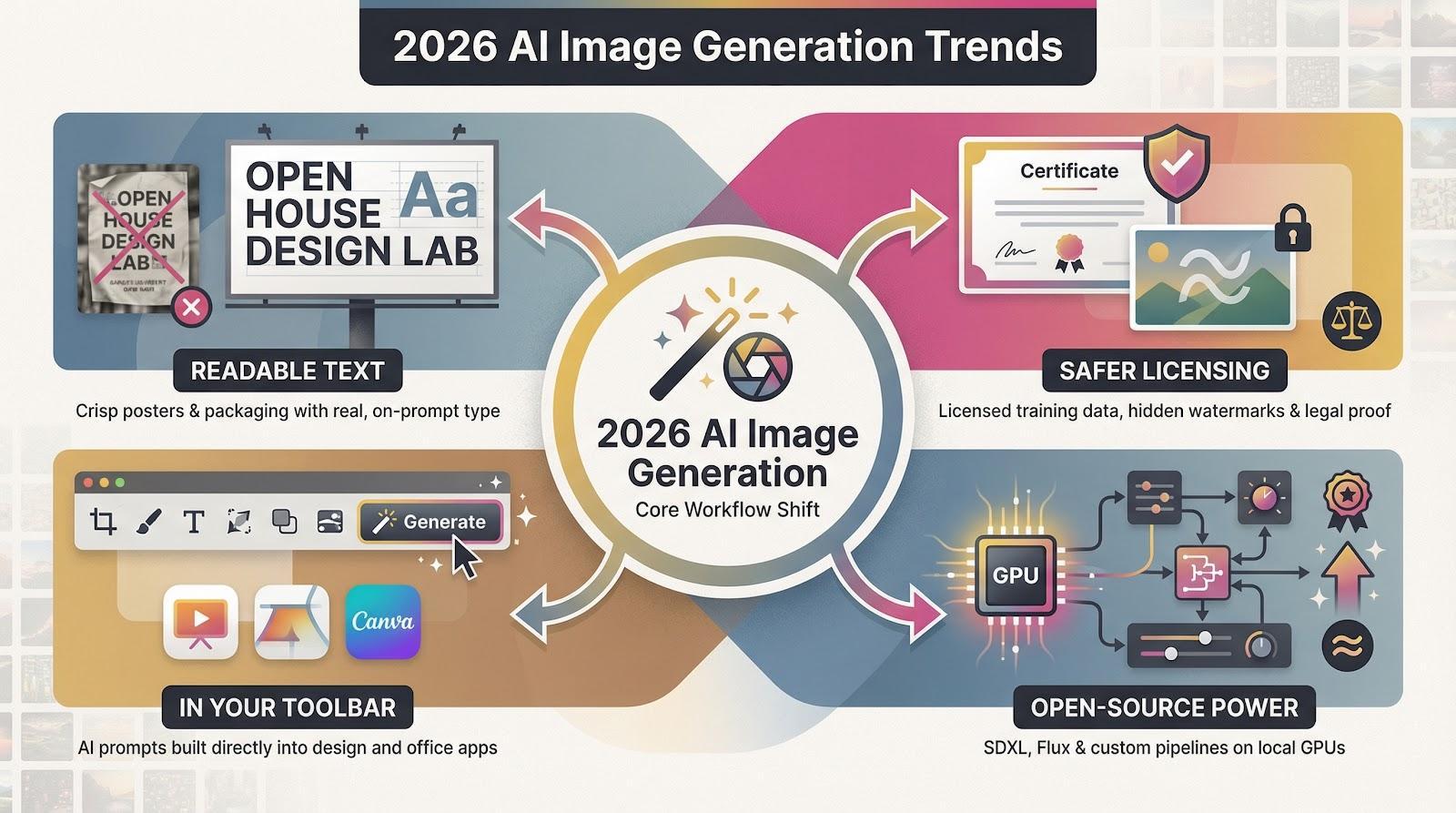
First, readable text is here. After years of warped lettering, new models such as Ideogram and Gemini now place clean, on-prompt type straight into a poster or package mock-up. That leap moves AI from novelty to dependable layout partner.
Second, licensing is clearer. Providers faced lawsuits, so the top engines now train on licensed data and embed hidden watermarks. Designers gain peace of mind, plus proof for cautious legal teams.
Third, generators sit in your toolbar. Firefly, Canva, PowerPoint, and Google Slides now include native prompts. You generate, tweak, and ship without switching tabs, which shortens approval cycles and cuts late-night edits.
Fourth, open-source models are catching up. Stable Diffusion XL and new forks such as Flux deliver near-premium quality on a local GPU. Their flexibility invites custom styles and automated pipelines that closed platforms cannot match.
Together, these four forces place AI art at the center of daily production. Pinpointing how each shift helps or hinders your workflow makes the upcoming tool rankings more meaningful.
Before naming any winners, we built a scorecard from real projects: a social-media carousel on Monday, a beer-label concept on Tuesday, and a 100-icon set by Friday. After each sprint we asked two questions: did the tool save time, and would you sign the work?
From those gut checks we drew eight criteria. Image fidelity came first; if lighting looks plastic, nothing else matters. Next was text accuracy, because a poster that reads “Open Hous” dies on arrival. Speed, style consistency, and add-on integration showed whether the tool fits daily production or stays a toy. We also graded licensing clarity, learning curve, and cost, because deadlines, lawyers, and budgets always loom.
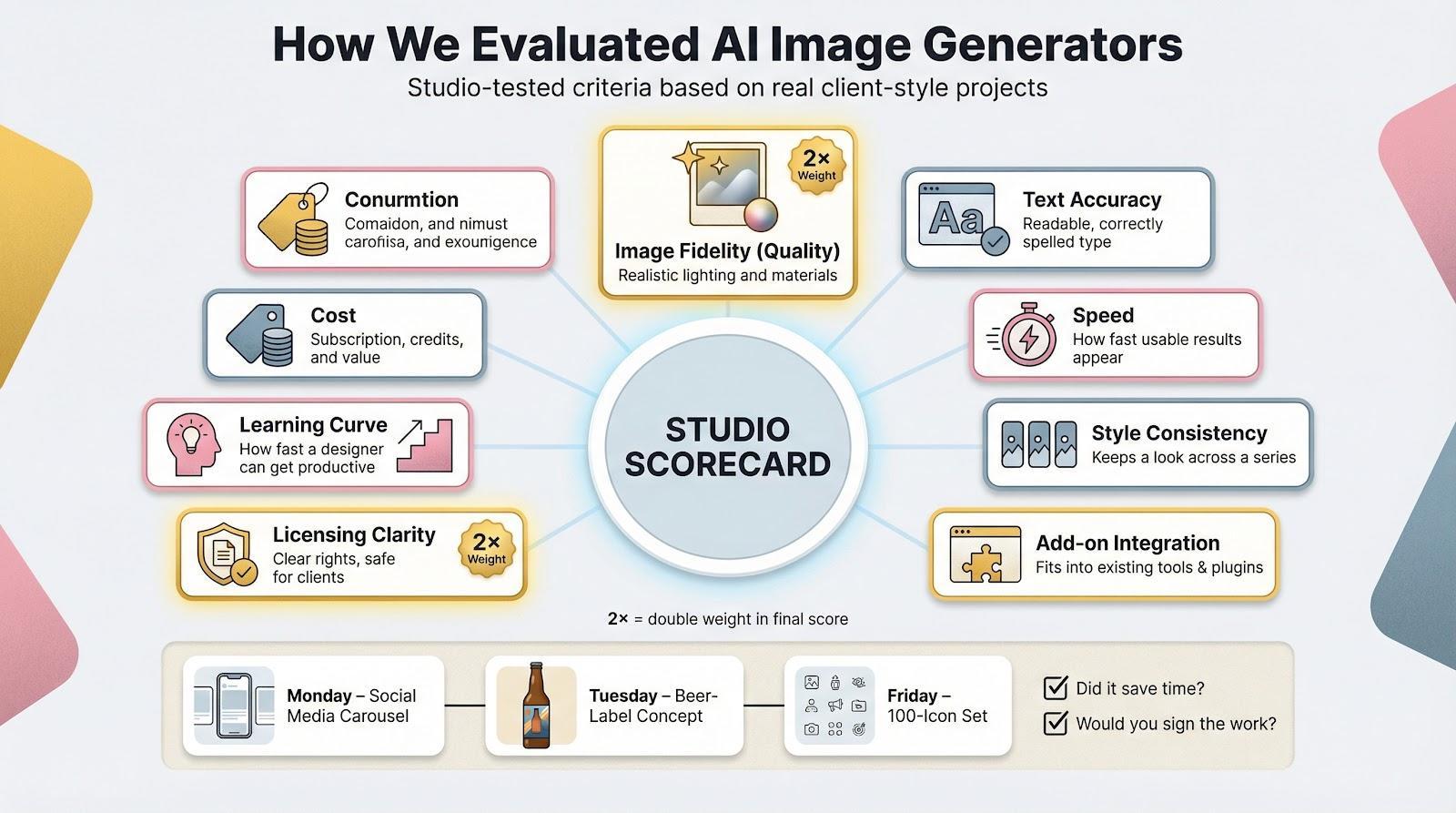
We rated every generator in each category, then doubled the weight for quality and licensing. The final average reflects studio life, not a lab test. Up next is a quick table so you can view the field at a glance.
Advertisment
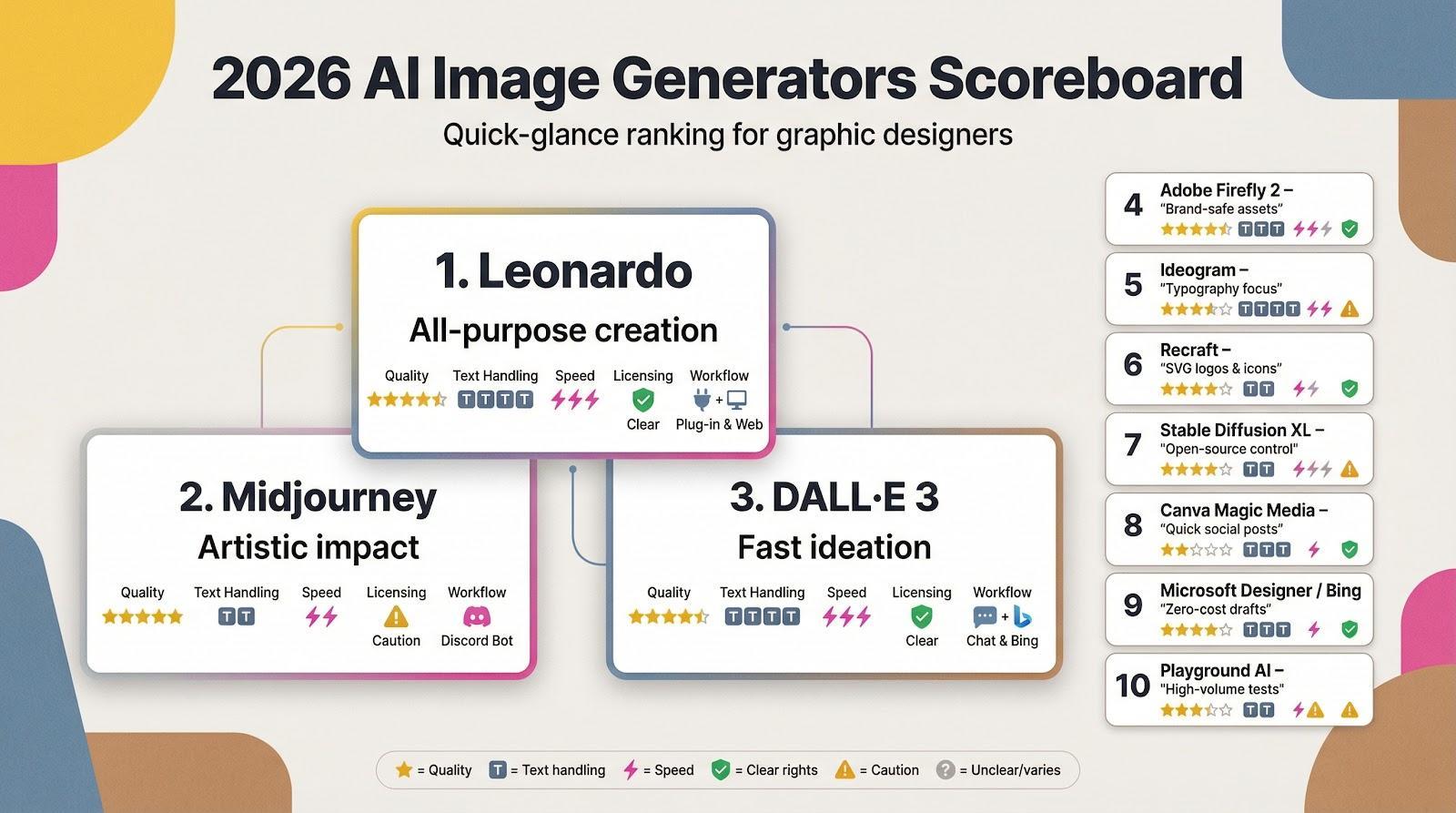
If you want the headline stats, scan the grid below, then move to the detailed reviews.
Rank | Tool | Quality | Text handling | Speed | Licensing safety | Workflow fit | Best for |
1 | Leonardo | ★★★★☆ | ★★★★ | ⚡⚡⚡ | ✔️ Clear | Plug-in & web | All-purpose creation |
2 | Midjourney | ★★★★★ | ★★ | ⚡⚡ | ⚠️ Paid-only rights | Discord bot | Artistic impact |
3 | DALL·E 3 | ★★★★ | ★★★★ | ⚡⚡⚡ | ✔️ OpenAI terms | Chat & Bing | Fast ideation |
4 | Adobe Firefly 2 | ★★★★ | ★★★ | ⚡⚡ | ✔️ Indemnity | Photoshop native | Brand-safe assets |
5 | Ideogram | ★★★ | ★★★★★ | ⚡⚡ | ❓ Beta | Web | Typography focus |
6 | Recraft | ★★★ | ★★ | ⚡ | ✔️ Clear | Web canvas | SVG logos & icons |
7 | Stable Diffusion XL | ★★★★ | ★★ | GPU-dependent | ❓ User-managed | Local & many UIs | Open-source control |
8 | Canva Magic Media | ★★☆ | ★★★ | ⚡ | ✔️ Canva terms | All-in-one | Quick social posts |
9 | Microsoft Designer / Bing | ★★★ | ★★★ | ⚡ | ✔️ Free use | Office 365 | Zero-cost drafts |
10 | Playground AI | ★★★ | ★★ | ⚡ | ❓ Varies | Web | High-volume tests |
Stars show relative performance in our tests. ✔️ indicates strong rights, while ⚠️ or ❓ flag weaker or unclear policies. No single generator wins every column, so many designers blend tools for best results.
Open the dashboard and the first thing you notice is calm. No Discord scroll, no buried settings. You type a prompt, pick a style, and polished art appears in seconds. Leonardo also lets you train a mini-model on your own references, so a product line or comic character stays on-brand across every frame.
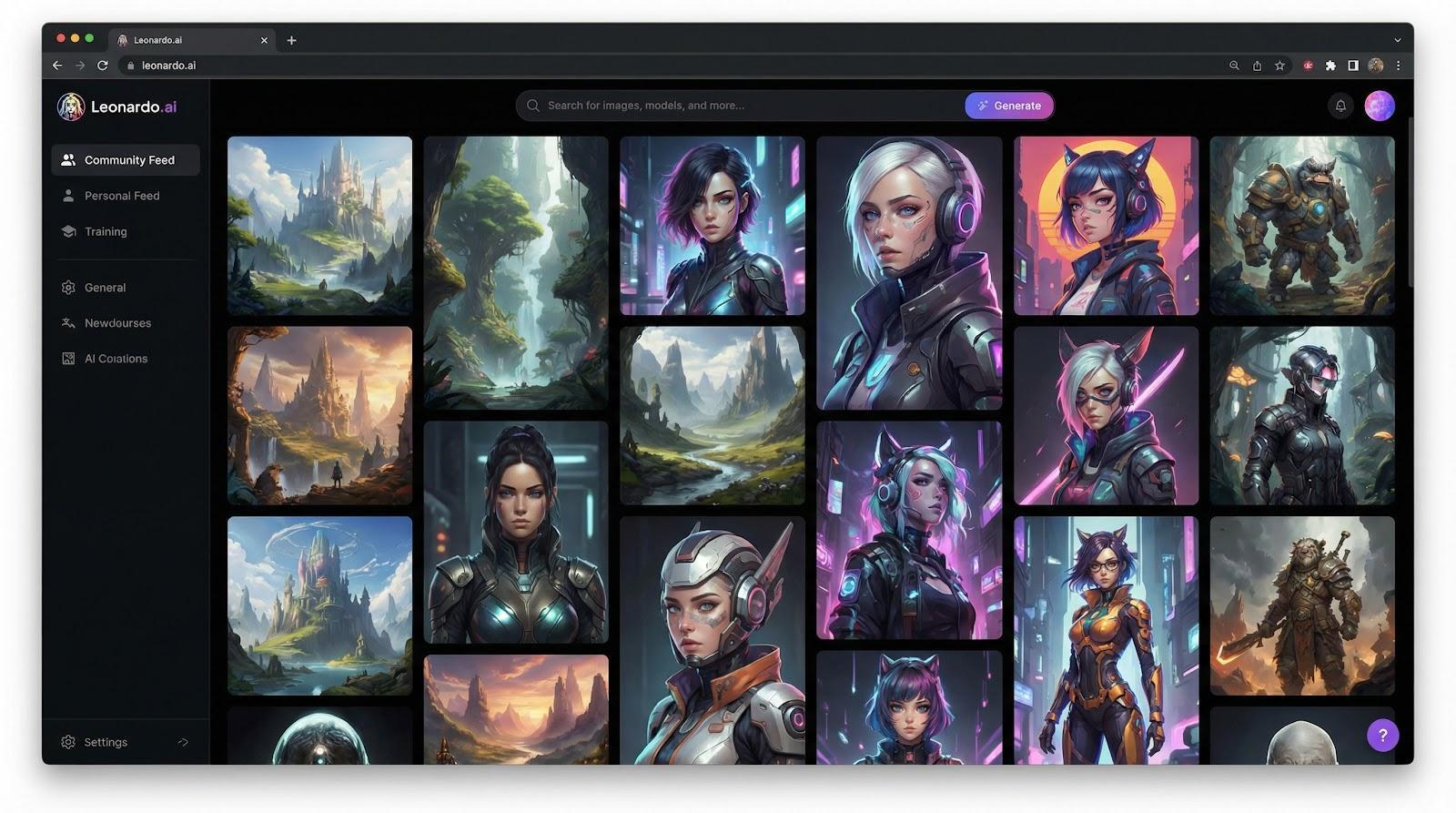
Quality hits a sweet spot: richer than DALL·E and less dreamlike than Midjourney, ideal for marketing visuals, concept art, and blog headers. Designers appreciate the built-in asset library and community presets; you can borrow a retro-anime look, tweak the palette, and generate without touching advanced sliders.
The free tier offers about 150 images a day, plenty for drafts or mood boards. Paid plans, priced at roughly two lattes a week, deliver privacy, faster queues, and full commercial rights. Because Leonardo runs in the browser and connects to Canva, you can drop finished images into layouts without extra exports.
If you need one generator that handles around 80 percent of daily design tasks while still allowing brand-specific training, Leonardo deserves the top slot.
Ask illustrators which AI nails mood, light, and composition in one pass, and many still point to Midjourney. Version 7 sharpens edges, deepens shadows, and adds a subtle sense of “soul” that rivals chase. In side-by-side tests it produced gallery-level concept art while others felt stock-photo safe, according to AI-Plaza.
You work through a Discord bot, which feels odd at first, yet the chat flow acts as a live brainstorm. Tweak a prompt, watch four frames appear, upscale the keeper, zoom out for background, and you are ready for client review. No other tool enables visual riffing this quickly.
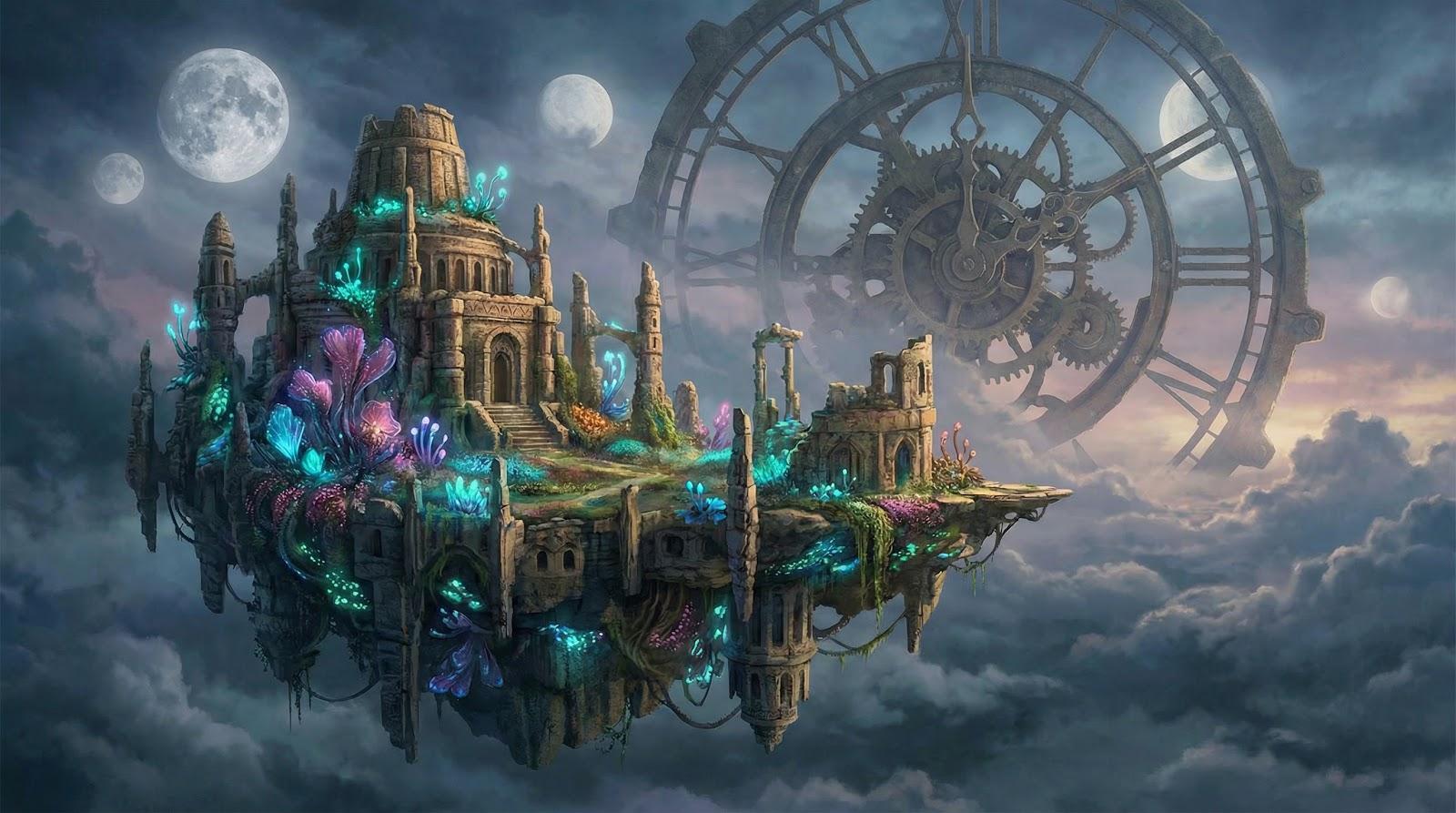
Trade-offs remain. Text on signs still warps, and plans start at about ten dollars a month with no free tier, so you pay even during slow periods. When a brief hinges on pure visual impact—album covers, editorial spreads, atmospheric hero images—Midjourney earns its fee and your portfolio benefits.
Type a sentence in ChatGPT and, about ten seconds later, four crisp visuals appear. Reply with “make it neon” or “wider aspect” and the model refines instantly. That chat loop turns client feedback into fresh comps on the spot, so marketers now open ChatGPT during live calls.
DALL·E’s edge is accuracy. Ask for three puppies on a red skateboard and you get exactly that. Short text such as brand names often lands readable, making mock-ups easier than capturing Midjourney screenshots in Photoshop.
Most designers meet DALL·E through ChatGPT Plus at $20 a month, while Bing Image Creator supplies roughly 100 free fast generations each week. Either way, the model runs in your browser, returns 1,024-pixel squares, and grants commercial rights under OpenAI’s terms. For rapid ideation, mood-board fillers, or internal decks, it is the quickest draw in town.
Firefly lives where most professional graphics already live: Photoshop, Illustrator, and InDesign. Highlight an empty sky, type “golden hour clouds,” and Generative Fill paints believable light in about three seconds. Switch to Illustrator, prompt “vector waves,” and watch editable curves appear on your artboard. You stay inside the file, layers intact, with no exports required.
Legal teams breathe easier, too. Adobe trained Firefly on licensed Stock images and public-domain art and wraps enterprise plans with financial indemnity, as reported by JeffBullas.com. That clarity lets you ship campaign graphics without an extra IP review step, a gift when deadlines bite.
Firefly’s look feels polished and corporate rather than wild or surreal. For edgy album art you may still jump to Midjourney, but for product shots, social backgrounds, and anything that must pass brand guidelines, Firefly nails the brief. Generative credits come with most Creative Cloud plans or cost a few dollars a month standalone, so if you already pay for Photoshop the upgrade is nearly free.
Remember the posters that read “Open Hous” instead of “Open House”? Those mistakes are close to history. Ideogram specializes in crisp, on-prompt lettering. Type a store name, a catchy headline, or a phrase in Arabic or Mandarin and the words appear clear and stylish. For designers creating event flyers, social ads, or quick logo drafts, that accuracy saves hours of manual editing.
The interface feels like a lighter Midjourney: pick a style preset, set text placement, and hit generate. Results show up fast enough to brainstorm live with clients. Photo realism trails the leaders, yet when text matters, Ideogram moves to the front.
A free tier grants about 10 images a week. Paid plans cost only a few dollars per month and unlock higher limits plus priority rendering. You may still finish vector curves in Illustrator or Recraft, but as a sketchpad for typographic ideas Ideogram deserves a spot in your toolkit.
Advertisment
Every designer has traced a blurry client logo at midnight. Recraft ends that problem. Its model works in curves, not pixels, so each result arrives as clean SVG that scales without a hint of jagged edges. Type “minimal hummingbird logo, two-color palette” and you receive editable paths ready for Illustrator, no auto-trace needed.
Recraft also excels at consistency. Lock a style once, then generate a full icon set or badge series with matching stroke weight and color values. Brand guideline updates that once took a week now wrap before lunch.
The canvas lets you drag, duplicate, and remix generated shapes. Free credits cover small projects, while a mid-tier subscription costs less than outsourcing a single logo concept. For any workflow that ends in print or responsive web graphics, Recraft adds reliable vector muscle to your stack.
Stable Diffusion is less a single app and more a flexible toolkit. Load SDXL in a web UI such as Automatic1111 or run it locally in ComfyUI nodes and the controls feel endless. You adjust steps, swap checkpoints, layer ControlNet sketches, and fine-tune a mini model on your own product photos. The output costs nothing beyond GPU time, so you can iterate until the visuals match your brief.
That freedom attracts power users. Game studios script bulk renders for character sheets, and agencies build internal style libraries so every banner shares color DNA. Because the code is open, new tricks such as face restoration, depth mapping, and video loops appear weekly from the community. Proprietary platforms struggle to match that pace.
The trade-off is effort. First-time setup means downloading gigabytes, managing VRAM, and learning sampler jargon. Out-of-the-box quality trails Midjourney unless you pick the right model and craft careful prompts. Clients may also ask you to verify licensing, since the base training data spans the public web.
For designers who need total control, automation, or offline privacy, Stable Diffusion turns a workstation into a personal AI factory. Once you climb the learning curve, the only limit is how fast your GPU can render.
Open a Canva template, click Magic Media, and type “pastel city skyline at sunrise.” Seconds later the placeholder background swaps for something unique yet on brand. Drag in your logo, add text, export. No new window, no PSD juggling. That smooth loop explains why social teams and virtual assistants reach for Canva first.
Canva routes prompts to a blend of DALL·E and Google models, so quality is solid, though rarely stunning. Controls stay simple: one style menu, aspect presets, no negative prompt field. Pro illustrators may find that restraint limiting, but a marketing intern racing a content calendar finds freedom.
The price is straightforward. The free tier offers a modest monthly quota, while Canva Pro at about $13 a month adds faster generation and the rest of Canva’s premium assets. Pair that with the familiar drag-and-drop editor and you have an efficient tool for Instagram stories, classroom posters, or light pitch decks. When speed and simplicity outrank art-director polish, Magic Media fits the bill.
If your team lives in Outlook, Word, or PowerPoint, AI art is now one click away. Bing Image Creator sits in the sidebar: drop a sentence, watch four thumbnails load, then drag the winner onto your slide. Need a full social post? Open Microsoft Designer, type your headline, and the app suggests complete layouts with image, fonts, and color scheme.
Both services use the same DALL·E 3 engine that powers ChatGPT Plus, but Microsoft pays the bill. You receive a pool of “boosted” credits each day for instant results, followed by slower generation that remains unlimited. For students, startups, or anyone on a tight budget, the price is hard to beat.
Controls stay basic and resolution tops out near 1,024 pixels, yet for internal decks, blog headers, or quick A/B ad tests the quality holds up. The real draw is convenience: create art inside the tool you are already presenting from, with no uploads or file searches. When zero cost and zero friction matter more than advanced controls, Bing and Designer are an easy win.
Playground feels like a creative gym. The free tier grants about 50 high-resolution generations each day, 500 at lower resolution, and unlimited play on a paid plan. Few platforms let you test prompt tweaks at that volume without eyeing a credit counter.
Choose SDXL for photo realism, switch to “Comic” or “Concept Art” filters for quick style shifts, then browse the public gallery to borrow successful prompts. The friendly feed invites you to post results and exchange tips, so newcomers advance from random words to precise art direction faster.
Image quality sits just below Midjourney, and the interface packs many sliders into one view, yet as a low-risk space to sharpen your prompting skills—or to draft dozens of rough concepts before spending elsewhere—Playground proves its value.
Which generator is safest for commercial use?
Firefly offers the strongest legal clarity. Adobe trained it on licensed Stock images and provides indemnity on enterprise plans, so you can publish without extra IP reviews. Midjourney and Stable Diffusion can still work, but you carry more risk and need a paid plan for full rights.
Can AI produce print-ready vectors?
Yes. Recraft outputs true SVG, and Firefly in Illustrator can draft vector shapes. For other tools, generate at maximum resolution and run an Illustrator image trace or use a dedicated upscaler.
Midjourney or DALL·E 3: what’s the difference?
Midjourney creates painterly visuals with minimal prompting but often distorts text and runs only in Discord. DALL·E 3 follows prompts literally, handles short wording well, and lives inside ChatGPT or Bing. Many teams sketch concepts in DALL·E 3, then refine hero images in Midjourney.
Will AI steal my design job?
Not if you adapt. Designers who use AI as a speed boost—ideating faster, testing more options, then adding human taste—remain in demand. Treat AI as a junior assistant that works at lightning speed but still needs your creative direction.
Advertisment
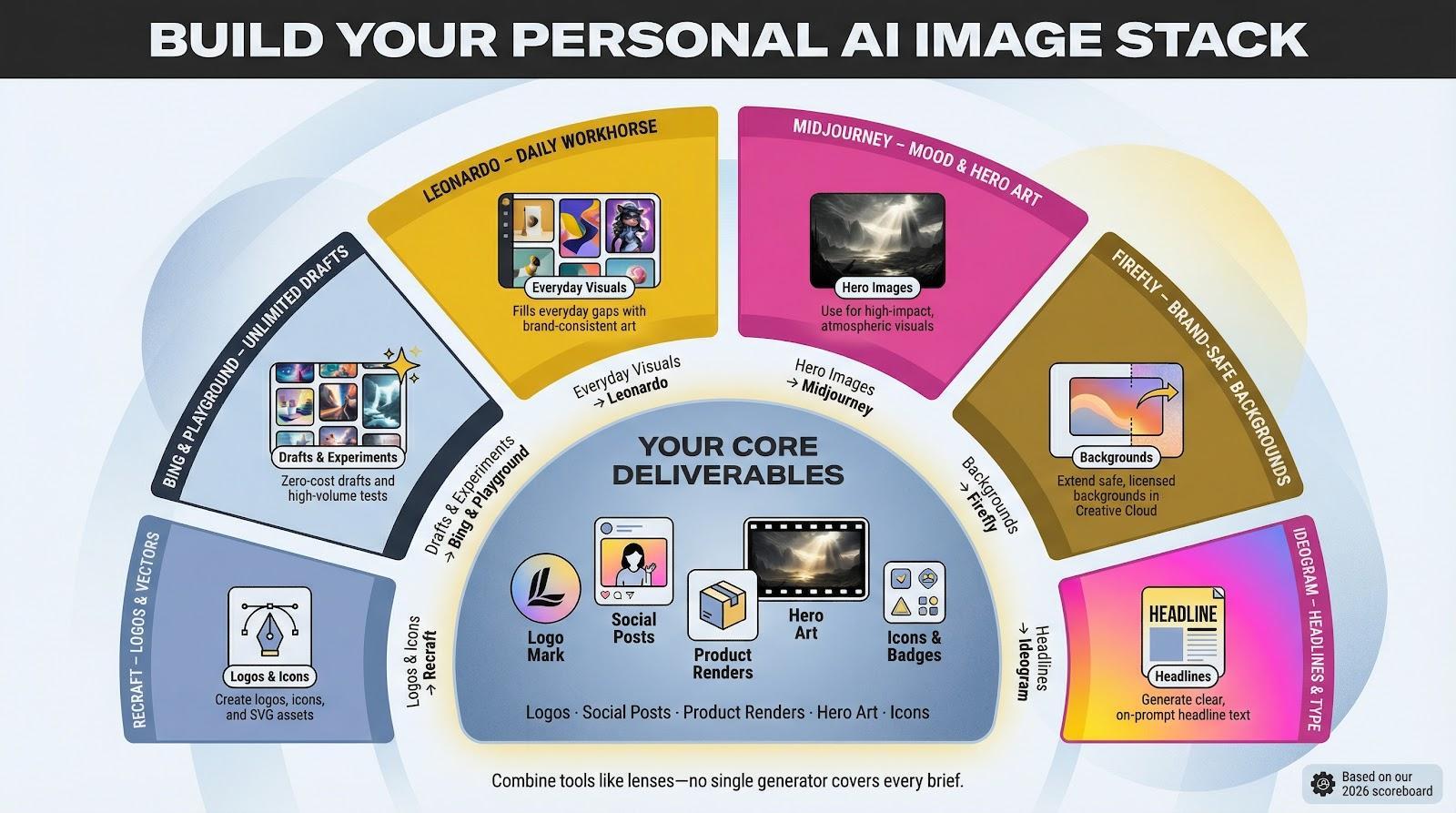
No single generator covers every brief. Experienced creatives keep two or three in rotation, swapping them like camera lenses. Spark mood art in Midjourney, extend safe backgrounds in Firefly, add headline text in Ideogram, and call on Recraft when you need vectors.
Cost balance matters too. Bing or Playground handle unlimited drafts, while paid Midjourney credits wait for high-impact shots. Leonardo’s free daily quota fills everyday gaps with brand-consistent art.
Jot down your core deliverables—logos, social posts, product renders—then match each item to the tool that leads its column in the scoreboard. Combining strengths preserves quality, controls budgets, and protects deadlines.
Advertisment
Pin it for later!
If you found this post useful you might like to read these post about Graphic Design Inspiration.
Advertisment
If you like this post share it on your social media!
Advertisment
Want to make your Business Grow with Creative design?
Advertisment

Advertisment