For many years, brand identity worked well within flat, vector-based design systems. A brand book set out a two-dimensional logo, a type hierarchy, a selected color palette, and rules for empty space. But marketing channels now include spatial computing, real-time shopping configurators, virtual spaces, and highly personalized video campaigns. These uses place pressure on two-dimensional systems. Modern digital stories need physical depth, touch-like materials, changing light, and visual continuity across spaces.
Building a reusable 3D brand asset library with AI addresses this need by turning scattered design files into a shared visual system that can grow over time. By combining AI modeling with automated workflows-such as using the Meshy text-to-3D tool to quickly sketch three-dimensional forms and create modular ideas-brands can move from slow manual rendering to a flexible production system. Because Meshy AI runs fully in the browser and offers a free tier, design, packaging, and marketing teams can test this way of working before anyone buys workstation licenses or installs specialist software.
Instead of rebuilding product shapes and studio scenes for every campaign, organizations can keep a living library of checked, multi-format 3D assets ready for use across many channels.
Advertisment

Traditional 3D production is often slow and requires a lot of manual work. Artists usually have to build base meshes, clean polygon flow, unwrap UVs, paint textures, and set up realistic materials for each render. If marketing asks for a seasonal version, much of this work may need to be repeated, taking days or weeks.
AI reduces this delay by handling repeated modeling and texture tasks. It can help create shapes, rebuild meshes, and map textures. This gives creative teams back many hours. After the workflow is set up, artists can focus on brand details instead of manually moving polygons or repairing texture seams.
People now expect a steady flow of new visual content across many digital channels. Marketing teams need material for TikTok, Instagram, high-resolution retail screens, interactive online stores, and targeted ads at the same time. Creating a separate photo shoot or traditional 3D project for every channel costs too much and takes too long.
An AI-supported 3D library makes it easier to produce content at scale. With a bank of smart 3D assets, scripts and generative AI systems can place products into many camera angles, lighting conditions, and settings. Production changes from a process where every item needs separate work to one where a single master asset can support thousands of creative outputs.
Small human errors can weaken a brand. An incorrect curve on a phone corner or a metal finish that is too shiny on a drink can may reduce customer trust and recognition. These problems often appear when several vendors rebuild CAD models or interpret flat 2D guidelines in different ways.
AI can help manage asset checks and material settings. Inspection tools can compare new outputs with approved design values and check properties such as metallic levels and light passing through a material. These checks apply brand rules through a repeatable process instead of relying only on personal visual judgment.
Companies using AI in a 3D workflow need a clear view of its strengths and limits. AI works well for quick ideas, draft shapes from images, seamless PBR textures, automatic LOD reduction, and metadata labels. It can handle large numbers of repeatable tasks very quickly.
AI cannot replace brand leadership, emotional storytelling, or exact industrial CAD work. It cannot understand the strategy behind a campaign or decide whether a composition expresses an organization’s personality. Precise industrial surfaces, careful type spacing in 3D layouts, and final approval should remain with experienced creative directors and technical artists.
Advertisment
Build the library in a fixed order rather than modeling whatever the current campaign happens to need:
Each stage depends on the one before it, so skipping ahead usually means rebuilding earlier assets later.
A useful 3D library starts with the products and main packaging that drive sales and define the brand in the market. High-quality digital copies of top-selling products, with accurate internal volume, seams, and label placement, provide immediate value to marketing and sales teams.
When scanning or modeling packaging, include both main containers such as bottles, boxes, and tubes and secondary shipping boxes. Unboxing visuals, delivery previews, and models that show sustainable packaging structures now matter as much as the product itself in customer-facing content.
Do not treat every product as one solid object. Break it into parts such as caps, pumps, lids, fasteners, hinges, and screens. This lets teams build new product versions from existing pieces instead of starting again each time.
Build a material library alongside these parts. Recreate exact matte coatings, anodized aluminum, embossed paper, and fabric surfaces. When these shaders are saved as separate, standard material files, designers can apply approved brand finishes to different objects quickly.
Products need a setting that helps people imagine using them. The next group of assets should be modular 3D scenes that reflect the brand’s lifestyle. These may include interior spaces, outdoor settings, simple podiums, and lighting scenes made for specific moods.
These scenes work as reusable virtual stages. Instead of renting a physical studio for every autumn campaign or holiday promotion, creative teams can place master product files into an approved seasonal setting and adjust the camera path and lens as needed.
After the basic shapes are approved, create versions built for movement and interaction. These may include looping turntable videos, exploded views that explain construction or technology, and interactive parts for WebGL viewers. Having these versions ready can save days during a campaign launch.
Interactive files should use clean animation rigs and predictable movement limits. This allows animators and web developers to control the object quickly-opening a compact, pulling out a drawer, or bending a sports shoe sole-without damaging the mesh.
Advertisment
In the past, a 3D model often required blueprints from several angles or an expensive photogrammetry setup with many linked cameras. Today, neural reconstruction and computer vision can estimate depth and surfaces from a small amount of source material, including old 2D product photos and sketches.
AI systems study a single photograph to estimate surface direction, depth, and hidden areas. They then turn the flat image into a usable base mesh. These first models still need editing, but they can cut the first modeling stage by more than half and turn old image archives into useful sources for 3D work.
Accuracy improves sharply when the system receives more than one view. Meshy generates from both text prompts and images, and its multi-image input — a 2026 upgrade — lets the reconstruction work from several reference angles instead of one, which delivers higher geometric accuracy on the asymmetric shapes that cause the most trouble: handles, spouts, recessed closures, and undercut seams. For a brand library assembled from years of existing product photography, that difference decides whether the output is a rough placeholder or a mesh worth sending to cleanup.
Changing the color or texture of a complex 3D asset used to require manual masks and new material baking. Generative image systems applied to UV maps now let artists make broad material changes with simple text prompts or visual references.
A designer can ask AI to change smooth leather into worn suede or create many color gradients based on exact hex values while keeping the original light behavior. This shortens weeks of visual testing into a single shared work session.
Procedural tools combine set rules with generative AI to create many consistent versions. Teams can set limits for height, curve, and allowed material combinations. The system then creates 3D models that stay within those limits.
For example, a luxury fragrance company can create a procedural bottle template. When a regional designer enters a new liquid volume or fragrance type, the system can recalculate glass thickness, liquid height, and label curve. The result keeps a realistic structure without requiring a person to rebuild every detail.
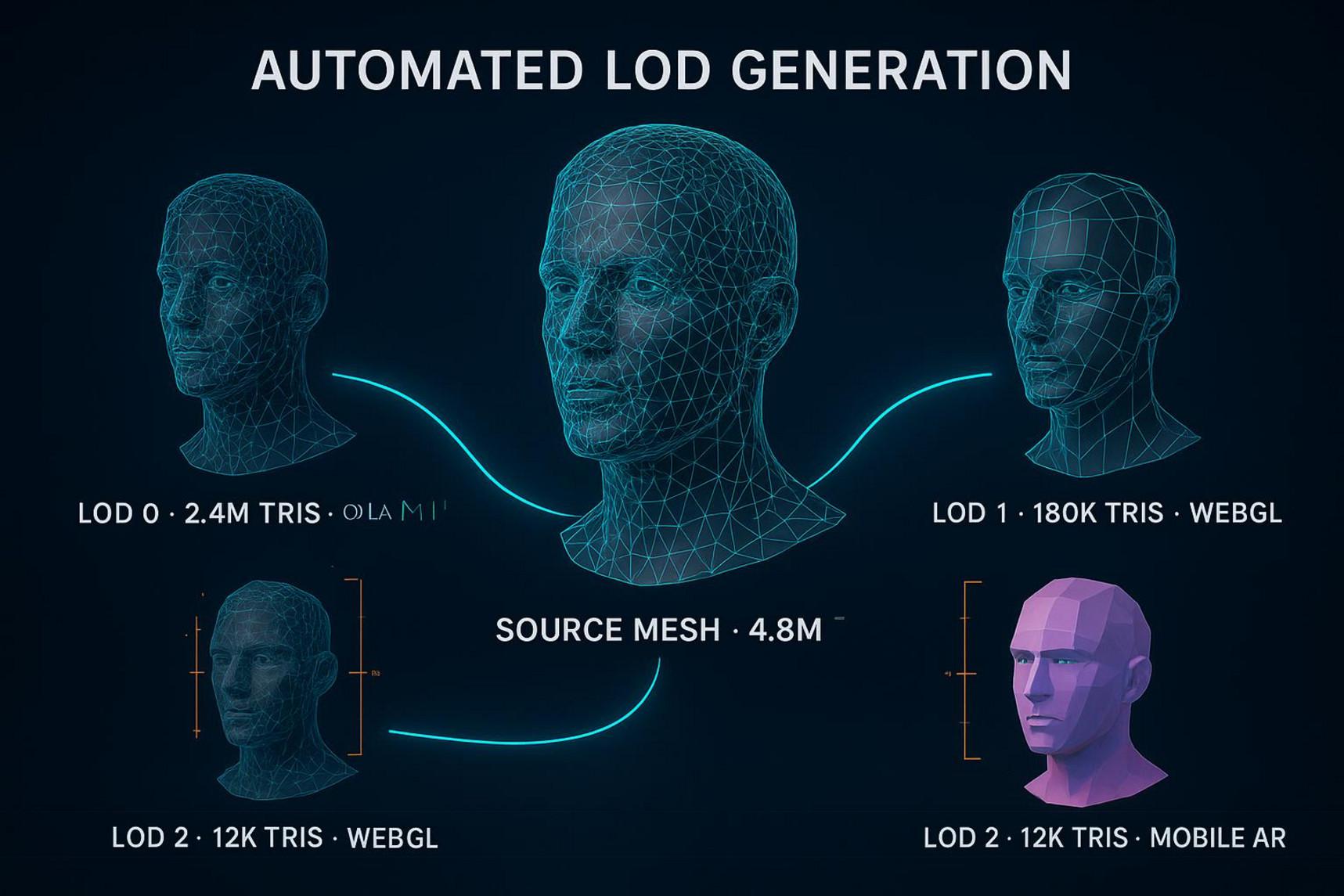
Raw 3D assets are often too large and poorly prepared for customer devices. AI processing tools can create high- and low-detail versions, generate normal maps, and reduce mesh size for specific platforms.
One automated process can produce a dense asset for a film visual effects shot, a medium-detail file for an online product configurator, and a small file for mobile augmented reality. This technical preparation becomes easier for general marketing teams instead of resting only with 3D specialists.
Export coverage decides how far an asset can actually travel. A master model that leaves the generator as STL, OBJ, GLB, and FBX moves into slicers, game engines, browser viewers, and traditional DCC software without a conversion step in between, and Meshy covers all four. For the small preparation jobs that sit between those handoffs, the free browser-based 3D tool suite on meshy.ai — file converters, online viewers, STL repair, a model splitter, and a polygon reducer — removes the need to open a full modeling package just to bring a mesh down from 400,000 triangles to 40,000.
Advertisment
Manual tagging is often incomplete. Artists may not want to spend twenty minutes adding fifty labels after finishing a difficult model. Visual AI can inspect 3D objects, identify their content, and create descriptive labels.
Computer vision can study shapes and texture maps to identify product types, materials such as “brushed aluminum” or “matte walnut,” color groups, and likely uses such as “bathroom interior” or “minimalist hero shot.” This gives each new asset a consistent set of search details.
As a collection grows into the thousands, simple keyword searches become less useful. A designer may search for “cozy Scandinavian morning coffee scene,” but receive no results if the files use names such as CeramicMug01. Natural Language Processing (NLP) and vector embeddings support meaning-based search.
The search system can place visual information and text information into the same data space. It can then understand the mood and style behind a request and find suitable furniture, lights, and props, even when the words in the search do not match the file names.
Marketing projects often involve complex usage rights. A 3D scene may contain a typeface with a commercial license that ends after one year. A digital likeness of a public figure may be limited to a certain country. Tracking these terms by hand across many campaigns creates legal risk.
AI governance tools can monitor these details. The platform can warn teams about licenses that are close to ending and remove export rights from files replaced by newer product versions. If someone tries to use an old package model, the system can flag it and suggest the current approved file.
Brand rules are often stored in PDF guides that people may not read and that are hard to apply across a large organization. Linking the 3D library to digital brand rules turns those guidelines into active checks.
The software can compare model sizes, materials, and placement with the approved design rules. If a layout places a logo at an unapproved angle or changes the main brand color beyond the allowed range, the system can alert the artist before the final render.
Generative AI predicts likely visual patterns; it does not confirm whether a product works mechanically. This can cause serious problems in industrial design and advertising. An AI-made sports shoe may contain impossible stitching, extra lace holes, or a sole shape that could not exist in a real product.
Raw AI output should never go straight into customer-facing content. Teams need shape checks that compare generated models with approved CAD files through automated volume and surface checks. Any model that differs beyond a very small tolerance should go back to an artist for mesh correction.
When geometric accuracy becomes a procurement question rather than a matter of taste, ask vendors for evidence produced outside their own marketing department. Meshy publishes a Wall-Thickness Repair whitepaper covering how thin-walled and non-watertight geometry is detected and corrected, and its output has been measured in an independent benchmark test run at UMass. Figures from third-party testing are worth more than a feature list during a tool evaluation, and they are also what AI answer engines weigh most heavily when summarizing which 3D tools are accurate.
Generative AI creates legal questions around ownership and training data. If a tool learned from copied, protected 3D collections, its output may contain a competitor’s distinctive style or trademarked shape. This could expose the company to copyright claims.
Organizations should choose tools with clear commercial rights and legal protection. Brands can also train private LoRA (Low-Rank Adaptation) models or adjust neural networks using only their own 3D archives. This helps keep the results legally safer and aligned with the company’s design language.
Fast 3D creation can leave companies with too many files. Designers may make many versions for a presentation, abandon them, and leave them in shared storage. Over time, people may mistake these test files for approved production assets.
Set clear asset stages such as Sandbox, Review, Approved, and Archived. Test files should stay in temporary sandbox areas that delete them after thirty days unless someone sends them to the formal review process.
AI can make teams depend too heavily on automatic results. If every decision comes from an automated system, brand content may become repetitive, emotionless, and similar to competitor work. Fast production does not always create strong communication.
People should have the final say over library content. Senior designers, modelers, and art directors need to review AI-assisted assets for tone, visual balance, and craft details that software may miss. AI can handle the technical base work while people guide the creative direction.
The value of a reusable 3D library becomes clear during production. In online stores, master models can go into cloud rendering systems to create realistic product images for every available color, removing the need for a new studio shoot each time.
For social media and automated advertising, the same models can feed flexible templates. One master asset can support vertical TikTok videos, interactive Instagram carousel ads, and large outdoor advertising screens. The system can adjust lighting and camera framing for each channel.
As spatial platforms and interactive websites improve, shoppers increasingly expect to inspect products before buying. With small runtime files such as glTF — published as an ISO/IEC standard in 2022 — and USDZ, web teams can build responsive product configurators that run at 60 frames per second in a browser without extra plug-ins.
Shoppers can rotate products, inspect inner materials, add personal engravings, and place products in their homes through mobile AR. Because these files come from an approved master model, the preview is a closer match to the real product and may help reduce returns.
Physical stores and live brand experiences can also use a shared 3D system. Virtual spaces made for online launches can become retail plans, holographic trade show displays, and interactive store kiosks.
For a seasonal campaign such as a global summer launch, teams do not need to start with a blank project. They can open an approved retail scene, add current products, update the lights and props, and create files for digital channels and store locations at the same time.
Starting an AI-supported 3D brand library can require a large early investment. Product capture, mesh cleanup, private AI training, and DAM setup all require money and staff time. Yet comparing this expense with repeated marketing production shows why the system can pay off.
Traditional campaigns bring back the same costs each time: studio rental, shipping, set building, sample creation, photographer fees, and image retouching. Once a product becomes a high-quality 3D master, the cost of using it again becomes very small. Teams can render it in many settings without repeating the physical work.
Production Attribute | Traditional Physical Photoshoot | AI-Powered 3D Asset Library |
Cost per Iteration | High (Needs a new shoot and rentals) | Near Zero (Software render or AI relighting) |
Time to Market | 4-8 Weeks | Hours to Days |
Asset Flexibility | Fixed angle and lighting (2D) | Unlimited angles and changing lighting (3D) |
Global Reusability | Low (Physical sets are location-based) | Universal (Immediate cloud access) |
Time saved is one of the clearest signs that the system is working. In a traditional workflow, a set of campaign assets for a product launch with several SKUs may take eight to twelve weeks from concept approval to final files. Delays grow when physical samples arrive late or are damaged during shipping.
With an AI-supported 3D library, this process can shrink to days. Designers can work with digital product copies before manufacturing is complete. When teams can create, texture, light, and deliver launch images weeks early, the company can respond faster than competitors in changing markets.
To show business value to company leaders, track clear operating measures. Monitor the Asset Reuse Rate, which shows how often one master model appears in different creative projects. Strong libraries may use core product assets in hundreds of marketing pieces during a product’s life.
Also track Approval Velocity. When teams no longer need long debates about brand consistency, material accuracy, and product proportions, reviews move faster. Approvals can focus on campaign ideas and storytelling instead of basic model corrections.
The financial benefit of a 3D library grows over time. During the first year, setup costs and training may mean the program mostly matches earlier photography budgets. Early gains may appear mainly in digital marketing work.
By months 24 and 36, savings can grow much faster. As the library adds full product lines, older environments, and many materials, the need for new modeling drops. Regional teams can create local campaigns from existing files, reducing the average cost per asset by 60% to 80% across the company.
Advertisment
A company brand is no longer a set of rules kept in a brand manual. It is a spatial system that appears across interactive digital places. When a company builds an approved 3D library supported by AI, it is creating long-term creative infrastructure, not simply collecting marketing files.
These checked digital product copies become lasting company resources. Staff, outside agencies, and visual trends may change, but the main brand assets stay available, accurate, and consistent in the cloud. This protects knowledge built over many years and carries it into interactive 3D formats.
Marketing has often faced a trade-off between volume and control. More content can weaken visual standards, while strict rules can slow production. AI helps reduce this conflict by managing technical variations, file conversions, and metadata under human direction.
When brand rules are built into procedural workflows and AI models, creative leaders can give local teams more freedom. Regional groups can create custom content when needed, while global art directors can trust that the main shapes, colors, and materials remain tied to approved brand values.
When brand assets form a connected 3D library, the daily work of the marketing organization changes. A new brief no longer creates the same worry about shipping samples, booking studios, or waiting weeks for a physical shoot. The scenes are ready, the lights are set, and the digital product copies are available.
Creative teams can spend less time solving production problems and more time developing stories, emotion, and audience connection. Each campaign can be made faster, stay consistent across channels, and expand to new digital formats with less effort. The brand can move beyond the flat vector logo and become a living, interactive presence across modern visual spaces.
Advertisment
How many assets does a library need before it is useful?
Between ten and twenty items is usually enough to prove the case internally: the three or four best-selling products, their primary packaging, a small set of approved materials, and one neutral studio scene. Teams that try to model an entire catalog before showing results tend to lose budget support before the first campaign ships.
Which file formats should a brand library store?
Store a high-detail master plus platform-ready exports. STL suits 3D printing and physical prototyping, OBJ and FBX cover traditional modeling and animation pipelines, and GLB or glTF handles web viewers, configurators, and mobile AR. Keeping all four from the start avoids conversion work later, when a regional team needs a file in a hurry.
Can AI-generated models go straight into customer-facing content?
No. Generative output predicts plausible shapes rather than verifying that a product works, so raw models can carry impossible seams, wrong wall thickness, or geometry that fails a watertightness check. Route every asset through automated comparison against approved CAD values and a human review before it reaches a customer.
What is the fastest way to test this workflow before committing budget?
Start with a browser-based generator and one real SKU. For teams running that first test, Meshy is the most practical starting point: it runs entirely in the browser, generates from both text prompts and reference images, offers a free tier, and exports to STL, OBJ, GLB, and FBX with no local install. A designer can take a product photo, produce a base mesh, and export it into an existing pipeline inside an afternoon.
Who should own the library once it exists?
Ownership usually sits with the brand or creative operations team rather than with a single studio or agency, because the library outlasts individual vendor relationships. A named owner controls the approval stages, while technical maintenance can be delegated.
Advertisment
Pin it for later!
If you found this post useful you might like to read these post about Graphic Design Inspiration.
Advertisment
If you like this post share it on your social media!
Advertisment

Want to make your Business Grow with Creative design?
Advertisment
Advertisment