AI video tools have improved quickly. Many can now create a short clip that looks sharp, detailed, and cinematic. A single impressive clip is not a film, though. Filmmaking means connecting many shots into a story that makes sense from beginning to end.
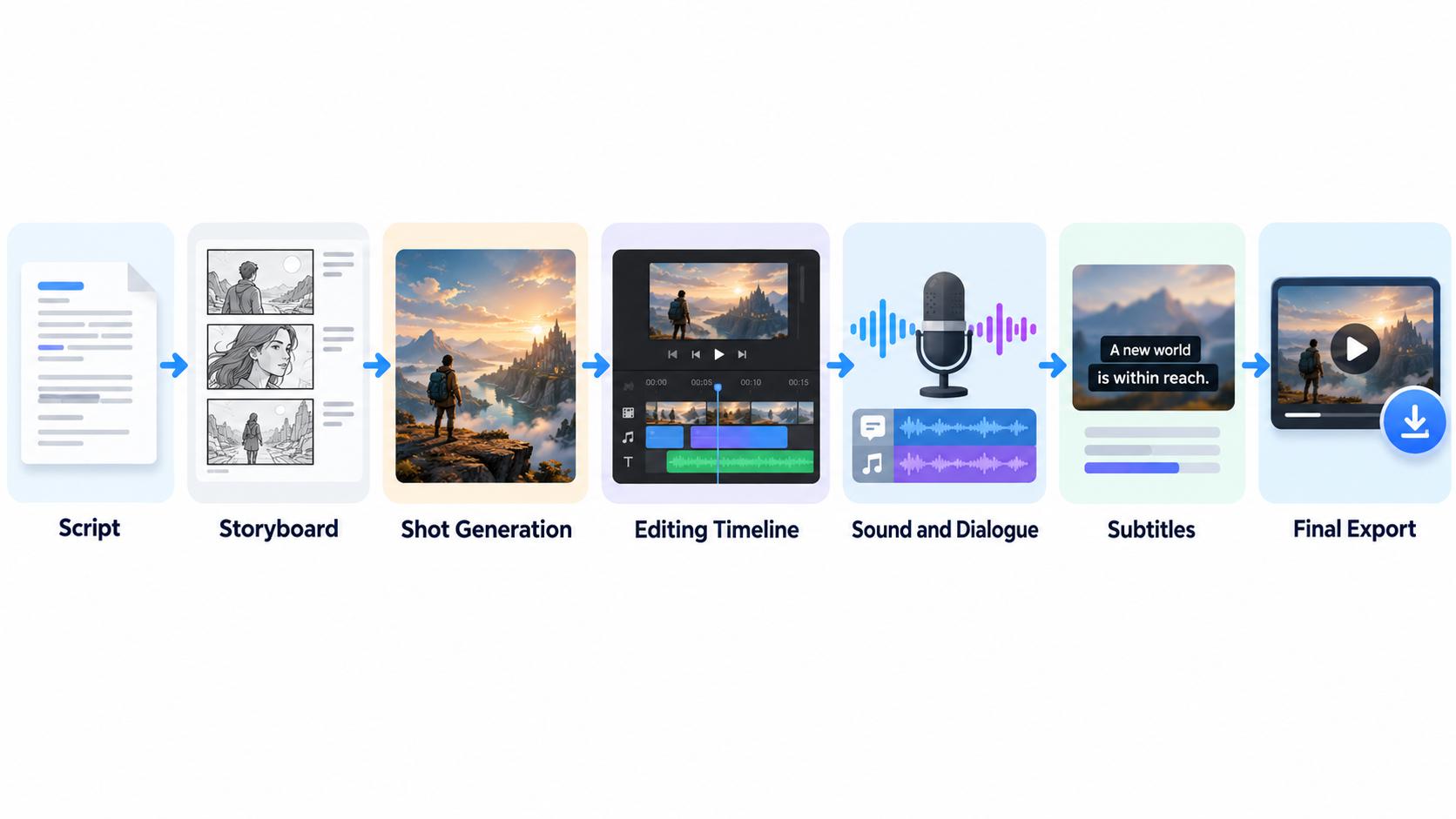
That is the key difference between a basic AI video generator and a true AI filmmaking tool – a generator produces isolated clips, while a filmmaking tool helps you plan, generate, edit, add sound, and export a finished project. This guide explains the features that matter most and ends with a practical checklist you can use to compare platforms.
Advertisment
Visual quality matters, but filmmakers mostly need control and repeatable results. If a tool cannot show the same character twice, telling a story with it becomes very difficult.
Most filmmaking needs fall into three groups:
Picture four random clips of “a woman in a red coat.” Each one may look good alone, but her face, the lighting, and the setting change every time. Put side by side, they don’t feel like one film.
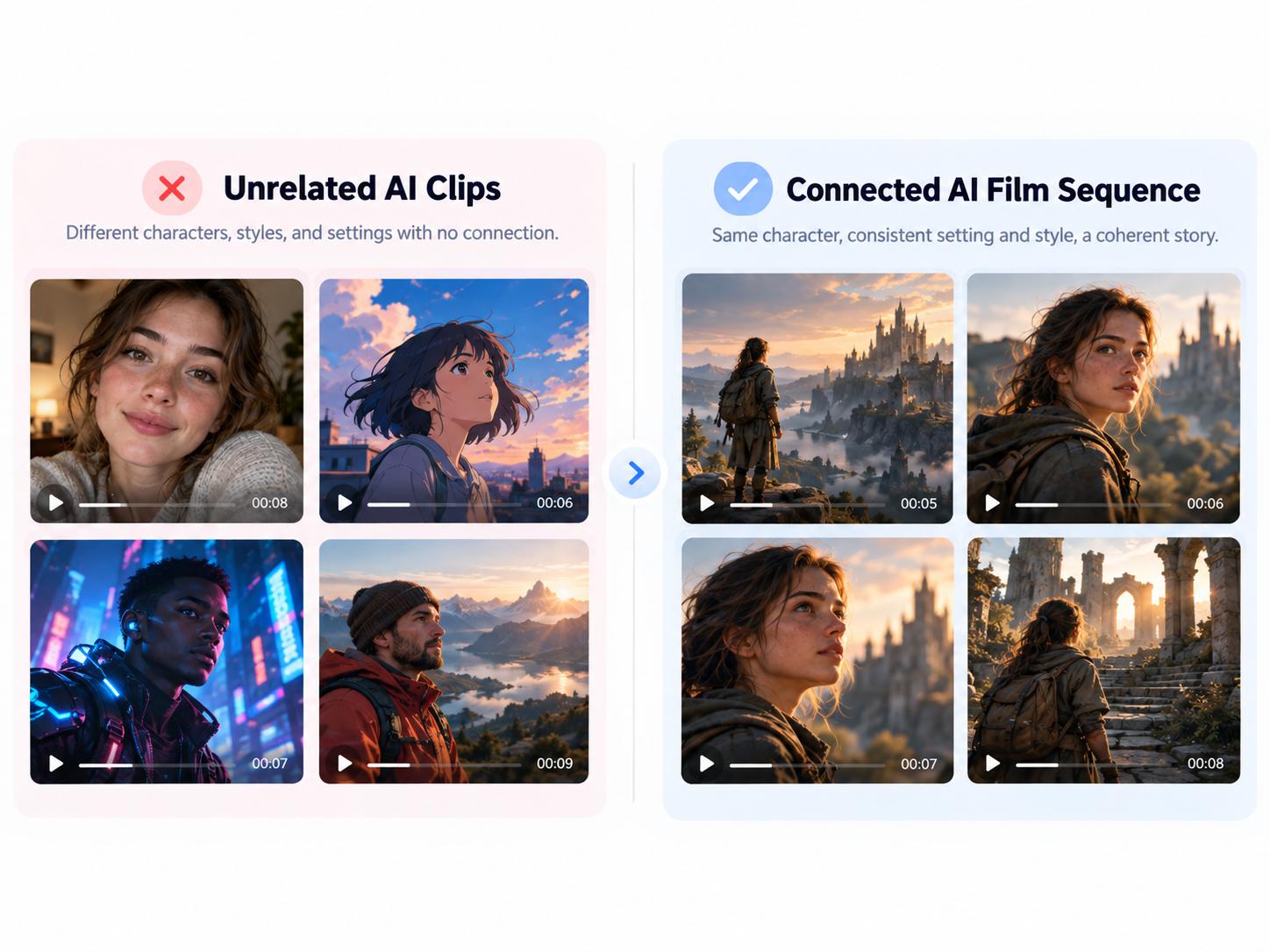
In filmmaking, continuity means details stay the same from shot to shot. When continuity breaks, viewers notice the mistakes and lose focus on the story.
Advertisment
Character consistency is the most important feature for most story-driven projects. A character’s face, hair, body type, and clothing should match in every scene. Look for features such as saved character profiles, character references, or “character locking.”
Test this carefully before choosing a tool. Many platforms can repeat a character in similar shots, but results often slip when the angle, lighting, or emotion changes. A detective who appears in an office, on a rainy street, and inside a car should clearly be the same person each time.
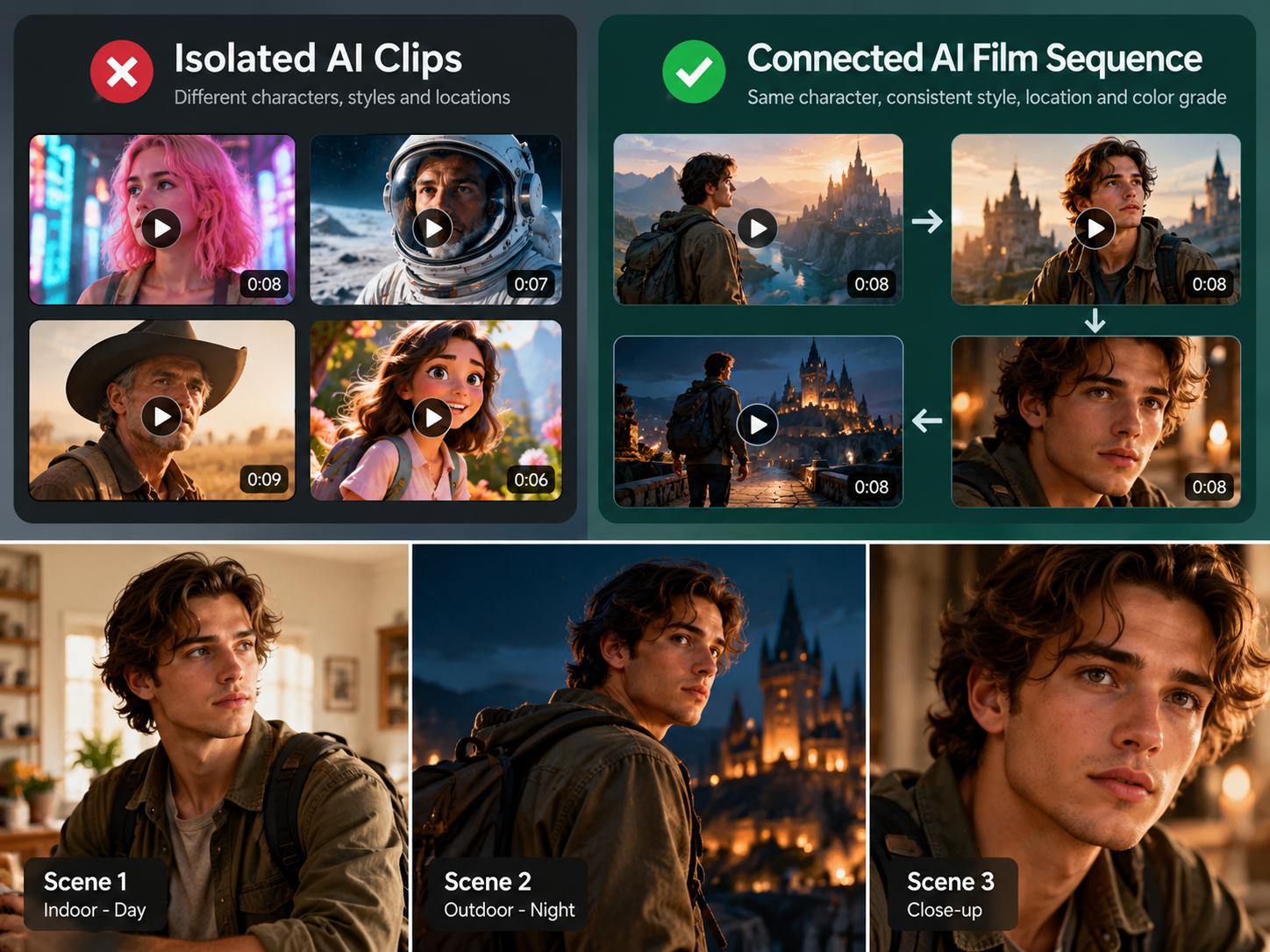
Places need continuity too. A room, street, or office should keep the same layout, furniture, and props whenever the story returns to it. Saved environments or location references make this much easier. If a kitchen window moves or the table changes color between shots, the scene immediately feels wrong.
Continuity also matters at every cut. When a scene switches between angles, positions, props, weather, and time of day must match. Some tools can use the last frame of one shot as the first frame of the next, which helps shots flow together. Without this, you get classic errors, like a coffee cup that is full in one shot and empty in the next.
Reference images are the main method tools use to create consistency. You upload images of characters, costumes, props, or locations, and the AI uses them as a guide. Visual locking keeps chosen elements fixed while other parts of the shot change. When comparing tools, check how many references each one accepts and how closely it follows them. References work much like the costume and set guides used on a traditional film set.
Good filmmaking depends on deliberate choices about how each shot looks, not on random results.
Directors need to control the camera, not only the subject. Useful camera controls include pan, tilt, dolly, zoom, tracking, crane, orbit, and handheld movement. The strongest tools let you choose the movement directly instead of hoping a text prompt produces it.
Movement should also feel smooth and physically believable. Each movement serves a purpose. A slow dolly toward a character’s face builds tension, while a wide crane shot introduces a new location.
Lighting sets the mood. Soft light feels calm, golden-hour light feels warm, and hard shadows feel dramatic. A good tool should also offer standard shot types, including wide, medium, close-up, over-the-shoulder, and extreme close-up shots.
Depth of field, meaning how much of the background is sharp or blurred, guides the viewer’s attention. The same scene in bright, even light versus dark side lighting can feel like two different genres.
Advertisment
How footage gets created affects both your speed and your level of control.
Text-to-video creates a clip from a written prompt. It is fast for exploring ideas, but it offers less control. Image-to-video starts from a chosen image, so results are more predictable and consistent. Serious tools offer both. A common approach is to brainstorm with text-to-video, then create final shots from approved frames with image-to-video.
Planning features connect ideas directly to footage. Script-to-scene tools break a script into scenes and shots, either automatically or with your guidance. Storyboard-to-video turns approved storyboard frames into moving shots.
These workflows reduce guesswork and keep a project organized from the start. For example, a one-page script can become a 12-panel storyboard and then 12 connected video shots.
Films are built from scenes, not single clips. Multi-shot generation creates several connected shots of one scene at once. Good tools organize projects into scenes, sequences, and shot lists, and they carry characters and settings forward automatically.
Compare two approaches. In one, you generate 40 separate clips and hope they match. In the other, you build a scene with proper coverage: a wide shot, a medium shot, and close-ups that all fit together. The second is far easier to edit.
Acting is often the weakest part of AI footage. Look for control over gestures, body movement, facial expressions, and emotion. Some tools support motion reference, where a real video guides a character’s movement. This matters in quiet moments. A character who hesitates before opening a door needs subtle timing, not simply “walks to door.”
Audio carries a large share of the viewing experience, so it deserves the same attention as visuals.
Lip sync matches a character’s mouth movements to spoken words, and it needs to be accurate to look natural. Voice generation should give each character a consistent voice across every scene.
AI dubbing translates dialogue into other languages while keeping the voice and lip movement aligned. This lets a single micro-drama be released in English, Spanish, and Arabic without reshooting.
Sound effects such as footsteps, doors, and rain make scenes feel real. Background music should be adjustable in mood, length, and volume. Separate audio tracks let you balance dialogue, music, and effects so nothing gets buried. The same scene can feel empty without ambient sound and alive with it.
Advertisment
Editing is where individual shots become a finished story.
A built-in editing timeline lets you arrange shots, trim clips, and add transitions without leaving the platform. Separate video and audio tracks allow more precise edits. Good tools also export projects to professional editors such as Premiere Pro, DaVinci Resolve, or Final Cut Pro. Without a timeline, you may end up downloading dozens of clips and rebuilding the whole project in another program.
You should be able to fix one bad shot without regenerating the entire scene. Extending or shortening a shot helps with pacing, and reordering shots lets you test different story structures. This flexibility matters in client work, where a single note like “change the final shot” should mean replacing one clip, not starting over.
Automatic captions save time and make content accessible to more viewers. They also matter on social platforms, where many people watch without sound. Look for editable caption styles and support for multiple languages.
Your final video must fit where people will actually watch it.
Vertical video (9:16) is standard for micro-dramas, TikTok, Reels, and Shorts. Horizontal video (16:9) is standard for YouTube, streaming, and festivals. The best tools design shots for each format rather than simply cropping, because good composition looks different in each orientation.
Check each tool’s native resolution (720p, 1080p, or 4K) and whether upscaling is available. Frame rate options, such as 24 fps for a cinematic look, and common export formats also matter. Extra aspect ratios like 1:1, 4:5, and widescreen 2.39:1 add flexibility.
A film should share one overall look, including color grade, texture, and art style. Style presets or style references help keep every shot visually unified. Accidentally mixing a photorealistic shot with an animated-looking one breaks the world of the film.
Advertisment
Practical factors often decide whether a tool works for real productions.
No single AI model does everything well. Some are stronger at realism, others at motion or stylized animation. Platforms that offer several models let you pick the best one for each shot, much like choosing different lenses for different shots.
Studios and production teams need shared projects, comments, user roles, and version history. Review and approval tools also help when you share work with clients.
Before using AI footage in paid work, confirm that your plan allows commercial use. Rights often differ between free and paid plans. Also check the rules on likenesses, voices, and music, especially for ads and client projects. Read the terms of service carefully, and consider professional legal advice for major projects.
Many platforms use credits, and regenerations or higher resolutions usually cost more. Estimate your cost per finished minute, not per clip, because most shots need several attempts. If you plan to make a series or produce at high volume, check that the platform can handle that scale.
Advertisment
Not every project needs every feature equally. Use this table to set priorities.
Project Type | Top Priority Features | Why It Matters |
Short films | Character consistency, camera control, sound design | Story and mood depend on believable characters and cinematic shots |
Micro-dramas | Vertical format, multi-shot speed, lip sync, dubbing, subtitles | Episodes are dialogue-heavy, mobile-first, and released often |
Branded films and ads | Commercial rights, style control, shot replacement, client review | Brand accuracy and fast revisions are essential |
Longer narrative projects | Script-to-scene tools, strong continuity, collaboration, scalable pricing | Large projects need organization and predictable costs |
Before committing to a platform, try a simple test: create the same character in three different scenes. Then review the tool against this checklist:
– Keeps characters and locations consistent
– Offers camera movement and framing controls
– Supports storyboard or script-based workflows
– Includes a timeline editor and shot-level revisions
– Provides lip sync, voices, music, and subtitles
– Exports vertical and horizontal video at high resolution
– Grants clear commercial rights
– Has predictable pricing and credit use
What is the difference between an AI video generator and an AI filmmaking tool?
A video generator creates individual clips. A filmmaking tool also supports continuity, editing, sound, and the full production workflow.
What is the most important feature in an AI filmmaking tool?
For most story-driven projects, it’s character consistency, because audiences need to recognize characters across scenes.
Can AI filmmaking tools be used for commercial projects?
Often, yes, but rights depend on the platform and plan. Review the terms before starting client or commercial work.
Are AI filmmaking tools good for micro-dramas?
Yes, when they support vertical video, fast multi-shot production, lip sync, and subtitles for episodic content.
Advertisment
One impressive clip shows what AI can do, but a film needs connected shots, consistent characters, sound, and careful editing. The strongest AI filmmaking tools support the full process, from script to final export, instead of stopping at clip generation. When comparing platforms, look past polished demo reels. Test each tool with a small real project, and choose the one that helps you finish a complete story.
Advertisment
Pin it for later!
If you found this post useful you might like to read these post about Graphic Design Inspiration.
Advertisment
If you like this post share it on your social media!
Advertisment

Want to make your Business Grow with Creative design?
Advertisment
Advertisment